SMB enumeration Link to heading
SMB is application layer protocol. This protocol is used for communication between PCs in same network. SMB mainly used for file transfer.
Here we are going to explian the enumeration techniques can be used for SMB protocol. Firat the below scan confirm the nmap ports are open in a server or not.
sudo nmap -sS -p- -Pn -T4 --min-rate 10000 -oN alltcp.txt 10.10.11.101
[sudo] password for rocky:
Host discovery disabled (-Pn). All addresses will be marked 'up' and scan times will be slower.
Starting Nmap 7.91 ( https://nmap.org ) at 2022-06-10 19:46 EDT
Nmap scan report for 10.10.11.101
Host is up (0.048s latency).
Not shown: 65531 closed ports
PORT    STATE SERVICE
22/tcp  open  ssh
80/tcp  open  http
139/tcp open  netbios-ssn
445/tcp open  microsoft-ds
Once we see 139,445 ( smb related ports) are open lets try to enumerate more at smb level.
Enum4linux Link to heading
enum4linux 10.10.11.101
Starting enum4linux v0.8.9 ( http://labs.portcullis.co.uk/application/enum4linux/ ) on Fri Jun 10 20:14:55 2022

 ==========================
|    Target Information    |
 ==========================
Target ........... 10.10.11.101
RID Range ........ 500-550,1000-1050
Username ......... ''
Password ......... ''
Known Usernames .. administrator, guest, krbtgt, domain admins, root, bin, none


 ====================================================
|    Enumerating Workgroup/Domain on 10.10.11.101    |
 ====================================================
[+] Got domain/workgroup name: WORKGROUP

 ============================================
|    Nbtstat Information for 10.10.11.101    |
 ============================================
Looking up status of 10.10.11.101
        WRITER          <00> -         B <ACTIVE>  Workstation Service
        WRITER          <03> -         B <ACTIVE>  Messenger Service
        WRITER          <20> -         B <ACTIVE>  File Server Service
        ..__MSBROWSE__. <01> - <GROUP> B <ACTIVE>  Master Browser
        WORKGROUP       <00> - <GROUP> B <ACTIVE>  Domain/Workgroup Name
        WORKGROUP       <1d> -         B <ACTIVE>  Master Browser
        WORKGROUP       <1e> - <GROUP> B <ACTIVE>  Browser Service Elections

        MAC Address = 00-00-00-00-00-00

 =====================================
|    Session Check on 10.10.11.101    |
 =====================================
[+] Server 10.10.11.101 allows sessions using username '', password ''

 ===========================================
|    Getting domain SID for 10.10.11.101    |
 ===========================================
Domain Name: WORKGROUP
Domain Sid: (NULL SID)
[+] Can't determine if host is part of domain or part of a workgroup

 ======================================
|    OS information on 10.10.11.101    |
 ======================================
Use of uninitialized value $os_info in concatenation (.) or string at ./enum4linux.pl line 464.
[+] Got OS info for 10.10.11.101 from smbclient:
[+] Got OS info for 10.10.11.101 from srvinfo:
        WRITER         Wk Sv PrQ Unx NT SNT writer server (Samba, Ubuntu)
        platform_id     :       500
        os version      :       6.1
        server type     :       0x809a03

 =============================
|    Users on 10.10.11.101    |
 =============================
index: 0x1 RID: 0x3e8 acb: 0x00000010 Account: kyle     Name: Kyle Travis       Desc:

user:[kyle] rid:[0x3e8]

 =========================================
|    Share Enumeration on 10.10.11.101    |
 =========================================

        Sharename       Type      Comment
        ---------       ----      -------
        print$          Disk      Printer Drivers
        writer2_project Disk
        IPC$            IPC       IPC Service (writer server (Samba, Ubuntu))
SMB1 disabled -- no workgroup available

[+] Attempting to map shares on 10.10.11.101
//10.10.11.101/print$   Mapping: DENIED, Listing: N/A
//10.10.11.101/writer2_project  Mapping: DENIED, Listing: N/A
//10.10.11.101/IPC$     [E] Can't understand response:
NT_STATUS_OBJECT_NAME_NOT_FOUND listing \*


 ==============================
|    Groups on 10.10.11.101    |
 ==============================

[+] Getting builtin groups:

[+] Getting builtin group memberships:

[+] Getting local groups:

[+] Getting local group memberships:

[+] Getting domain groups:

[+] Getting domain group memberships:

 =======================================================================
|    Users on 10.10.11.101 via RID cycling (RIDS: 500-550,1000-1050)    |
 =======================================================================
[I] Found new SID: S-1-22-1
[I] Found new SID: S-1-5-21-1663171886-1921258872-720408159
[I] Found new SID: S-1-5-32
[+] Enumerating users using SID S-1-5-21-1663171886-1921258872-720408159 and logon username '', password ''
S-1-5-21-1663171886-1921258872-720408159-500 *unknown*\*unknown* (8)
S-1-5-21-1663171886-1921258872-720408159-501 WRITER\nobody (Local User)
8)
S-1-5-21-1663171886-1921258872-720408159-508 *unknown*\*unknown* (8)
S-1-5-21-1663171886-1921258872-720408159-509 *unknown*\*unknown* (8)
S-1-5-21-1663171886-1921258872-720408159-510 *unknown*\*unknown* (8)
S-1-5-21-1663171886-1921258872-720408159-511 *unknown*\*unknown* (8)
S-1-5-21-1663171886-1921258872-720408159-512 *unknown*\*unknown* (8)
S-1-5-21-1663171886-1921258872-720408159-513 WRITER\None (Domain Group)
S-1-5-21-1663171886-1921258872-720408159-514 *unknown*\*unknown* (8)
S-1-5-21-1663171886-1921258872-720408159-515 *unknown*\*unknown* (8)

S-1-5-21-1663171886-1921258872-720408159-522 *unknown*\*unknown* (8)
S-1-5-21-1663171886-1921258872-720408159-523 *unknown*\*unknown* (8)
S-1-5-21-1
S-1-5-21-1663171886-1921258872-720408159-548 *unknown*\*unknown* (8)
S-1-5-21-1663171886-1921258872-720408159-549 *unknown*\*unknown* (8)
S-1-5-21-1663171886-1921258872-720408159-550 *unknown*\*unknown* (8)
S-1-5-21-1663171886-1921258872-720408159-1000 WRITER\kyle (Local User)
S-1-5-21-1663171886-1921258872-720408159-1001 *unknown*\*unknown* (8)
S-1-5-21-1663171886-1921258872-720408159-1002 *unknown*\*unknown* (8)

S-1-5-
S-1-5-21-166
S-1-5-21-1663171886-1921258872-720408159-1048 *unknown*\*unknown* (8)
S-1-5-21-1663171886-1921258872-720408159-1049 *unknown*\*unknown* (8)
S-1-5-21-1663171886-1921258872-720408159-1050 *unknown*\*unknown* (8)
[+] Enumerating users using SID S-1-5-32 and logon username '', password ''
S-1-5-32-500 *unknown*\*unknown* (8)
S
S-1-5-32
S-1-5-32-543 *unknown*\*unknown* (8)
S-1-5-32-544 BUILTIN\Administrators (Local Group)
S-1-5-32-545 BUILTIN\Users (Local Group)
S-1-5-32-546 BUILTIN\Guests (Local Group)
S-1-5-32-547 BUILTIN\Power Users (Local Group)
S-1-5-32-548 BUILTIN\Account Operators (Local Group)
S-1-5-32-549 BUILTIN\Server Operators (Local Group)
S-1-5-32-550 BUILTIN\Print Operators (Local Group)
S-1-5-32-1000 *unknown*\*unknown* (8)

S)

S-1-5-32-1048 *unknown*\*unknown* (8)
S-1-5-32-1049 *unknown*\*unknown* (8)
S-1-5-32-1050 *unknown*\*unknown* (8)
[+] Enumerating users using SID S-1-22-1 and logon username '', password ''
S-1-22-1-1000 Unix User\kyle (Local User)
S-1-22-1-1001 Unix User\john (Local User)
This gives some usernames and smbshare folder names.If there is anonymous permission enabled, it will display here:
[+] Attempting to map shares on 10.10.11.101
//10.10.11.101/print$   Mapping: DENIED, Listing: N/A
//10.10.11.101/writer2_project  Mapping: DENIED, Listing: N/A
//10.10.11.101/IPC$     [E] Can't understand response:
NT_STATUS_OBJECT_NAME_NOT_FOUND listing \*
In this case anonymous permission is denied.
refer below example for Anonymous smbclient access:
smbclient -L \\10.129.127.166\\
Enter WORKGROUP\rocky's password:
Anonymous login successful

        Sharename       Type      Comment
        ---------       ----      -------
        ADMIN$          Disk      Remote Admin
        C$              Disk      Default share
        IPC$            IPC       Remote IPC
        NETLOGON        Disk      Logon server share
        Replication     Disk
        SYSVOL          Disk      Logon server share
        Users           Disk
SMB1 disabled -- no workgroup available
Here without password i can view the smb shares, when password asked simply press enter.This anonymous access was identified on enum4linux command. We can see which folder is having the permission to enumerate without password.
 Share Enumeration on 10.129.127.166    |
 ===========================================
Use of uninitialized value $global_workgroup in concatenation (.) or string at ./enum4linux.pl line 640.

        Sharename       Type      Comment
        ---------       ----      -------
        ADMIN$          Disk      Remote Admin
        C$              Disk      Default share
        IPC$            IPC       Remote IPC
        NETLOGON        Disk      Logon server share
        Replication     Disk
        SYSVOL          Disk      Logon server share
        Users           Disk
SMB1 disabled -- no workgroup available

[+] Attempting to map shares on 10.129.127.166
Use of uninitialized value $global_workgroup in concatenation (.) or string at ./enum4linux.pl line 654.
//10.129.127.166/ADMIN$ Mapping: DENIED, Listing: N/A
Use of uninitialized value $global_workgroup in concatenation (.) or string at ./enum4linux.pl line 654.
//10.129.127.166/C$     Mapping: DENIED, Listing: N/A
Use of uninitialized value $global_workgroup in concatenation (.) or string at ./enum4linux.pl line 654.
//10.129.127.166/IPC$   Mapping: OK     Listing: DENIED
Use of uninitialized value $global_workgroup in concatenation (.) or string at ./enum4linux.pl line 654.
//10.129.127.166/NETLOGON       Mapping: DENIED, Listing: N/A
Use of uninitialized value $global_workgroup in concatenation (.) or string at ./enum4linux.pl line 654.
//10.129.127.166/Replication    Mapping: OK, Listing: OK
Use of uninitialized value $global_workgroup in concatenation (.) or string at ./enum4linux.pl line 654.
//10.129.127.166/SYSVOL Mapping: DENIED, Listing: N/A
Use of uninitialized value $global_workgroup in concatenation (.) or string at ./enum4linux.pl line 654.
//10.129.127.166/Users  Mapping: DENIED, Listing: N/A
Refer the folder “Replication” is showing as “Listing” OK which means it has the anonymous permission. Or the same can be found in neater output with “smbmap”
smbmap -H 10.129.127.166
[+] IP: 10.129.127.166:445      Name: 10.129.127.166
        Disk                                                    Permissions     Comment
        ----                                                    -----------     -------
        ADMIN$                                                  NO ACCESS       Remote Admin
        C$                                                      NO ACCESS       Default share
        IPC$                                                    NO ACCESS       Remote IPC
        NETLOGON                                                NO ACCESS       Logon server share
        Replication                                             READ ONLY
        SYSVOL                                                  NO ACCESS       Logon server share
        Users                                                   NO ACCESS
lets try to access the folder “Replication"anonyously
smbclient -L \\10.129.127.166\\Replication
Enter WORKGROUP\rocky's password:
Anonymous login successful

        Sharename       Type      Comment
        ---------       ----      -------
        ADMIN$          Disk      Remote Admin
        C$              Disk      Default share
        IPC$            IPC       Remote IPC
        NETLOGON        Disk      Logon server share
        Replication     Disk
        SYSVOL          Disk      Logon server share
        Users           Disk
mbclient  \\\\10.129.127.166\\Replication                                                                                                           1 ⨯
Enter WORKGROUP\rocky's password:
Anonymous login successful
Try "help" to get a list of possible commands.
smb: \> ls
  .                                   D        0  Sat Jul 21 06:37:44 2018
  ..                                  D        0  Sat Jul 21 06:37:44 2018
  active.htb                          D        0  Sat Jul 21 06:37:44 2018

                5217023 blocks of size 4096. 279427 blocks available
smb: \> exit

┌──(rocky㉿kali)-[~/hckbox/Active-1]
└─$ mkdir smb

┌──(rocky㉿kali)-[~/hckbox/Active-1]
└─$ cd smb

┌──(rocky㉿kali)-[~/hckbox/Active-1/smb]
└─$ smbclient  \\\\10.129.127.166\\Replication
Enter WORKGROUP\rocky's password:
Anonymous login successful
Try "help" to get a list of possible commands.
smb: \> cd active.htb
smb: \active.htb\> ls
  .                                   D        0  Sat Jul 21 06:37:44 2018
  ..                                  D        0  Sat Jul 21 06:37:44 2018
  DfsrPrivate                       DHS        0  Sat Jul 21 06:37:44 2018
  Policies                            D        0  Sat Jul 21 06:37:44 2018
  scripts                             D        0  Wed Jul 18 14:48:57 2018
RPCclient for enumeration Link to heading
The same information above can be checked via rpc client command.

If username is unknown rpcclient can be connected like this
$ rpcclient -U "" -N 10.10.11.101
rpcclient $>
More enumeration commands in rpcclients to find the usernames/groups/password criteria/domain etc
└─$ rpcclient -U "" -N 10.10.11.101
rpcclient $> enumdomains
name:[WRITER] idx:[0x0]
name:[Builtin] idx:[0x1]
rpcclient $> enumdomusers
user:[kyle] rid:[0x3e8]
rpcclient $> enumdomgroups
rpcclient $> queryuser 0x3e8
        User Name   :   kyle
        Full Name   :   Kyle Travis
        Home Drive  :   \\writer\kyle
        Dir Drive   :
        Profile Path:   \\writer\kyle\profile
        Logon Script:
        Description :
        Workstations:
        Comment     :
        Remote Dial :
        Logon Time               :      Wed, 31 Dec 1969 19:00:00 EST
        Logoff Time              :      Wed, 06 Feb 2036 10:06:39 EST
        Kickoff Time             :      Wed, 06 Feb 2036 10:06:39 EST
        Password last set Time   :      Tue, 18 May 2021 13:03:35 EDT
        Password can change Time :      Tue, 18 May 2021 13:03:35 EDT
        Password must change Time:      Wed, 13 Sep 30828 22:48:05 EDT
        unknown_2[0..31]...
        user_rid :      0x3e8
        group_rid:      0x201
        acb_info :      0x00000010
        fields_present: 0x00ffffff
        logon_divs:     168
        bad_password_count:     0x00000000
        logon_count:    0x00000000
        padding1[0..7]...
        logon_hrs[0..21]...
To see the directory information
rpcclient $> netshareenum
netname: writer2_project
        remark:
        path:   C:\var\www\writer2_project
        password:
rpcclient $> netshareenumall
netname: print$
        remark: Printer Drivers
        path:   C:\var\lib\samba\printers
        password:
netname: writer2_project
        remark:
        path:   C:\var\www\writer2_project
        password:
netname: IPC$
        remark: IPC Service (writer server (Samba, Ubuntu))
        path:   C:\tmp
        password:
nmapsmb enumeration scripts Link to heading
The below scripts can be used to find the shares and users. However in this case, i have not received any useful information. It may be due the anonymous access is not allowed.
sudo nmap -p 135,139,445 -script smb-enum-shares.nse 10.10.11.101
sudo nmap -p 135,139,445 -script smb-enum-users.nse 10.10.11.101
Crackmapexec Link to heading
crackmapexec is tool mainly built for active directory enumeration to track the information in stealthy way. However it can be used for detecting the smbshared/domain/sessions as well.
Usage if username and password in unknown
crackmapexec smb 10.10.11.101
SMB         10.10.11.101    445    WRITER           [*] Windows 6.1 Build 0 (name:WRITER) (domain:) (signing:False) (SMBv1:False)
Smbmap Link to heading
Smbmap can be used to list the shares information. Mainly i use this tool to list the share information in detail including the permission on these folders.
-R can be used to recursivly list down the foiles in share
Anonymous access can be tested like this
smbmap -H 10.10.11.101 -u null
smbmap -H 10.10.11.101 -R
[+] Guest session       IP: 10.10.11.101:445    Name: 10.10.11.101
        Disk                                                    Permissions     Comment
        ----                                                    -----------     -------
        print$                                                  NO ACCESS       Printer Drivers
        writer2_project                                         NO ACCESS
        IPC$                                                    NO ACCESS       IPC Service (writer server (Samba, Ubuntu))
[+] IP: 10.10.11.101:445        Name: 10.10.11.101
        Disk                                                    Permissions     Comment
        ----                                                    -----------     -------
        print$                                                  NO ACCESS       Printer Drivers
        writer2_project                                         NO ACCESS
        IPC$                                                    NO ACCESS       IPC Service (writer server (Samba, Ubuntu))
It list the shares however no access for them anonymously.
In another scenario we have folder with anonymous access which is shown via smbmap. Also please make sure to use -R option to view the files as sometime the number folders are files will be many to enumerate.
One example for anonymous access:
 smbmap -H 10.129.127.166
[+] IP: 10.129.127.166:445      Name: 10.129.127.166
        Disk                                                    Permissions     Comment
        ----                                                    -----------     -------
        ADMIN$                                                  NO ACCESS       Remote Admin
        C$                                                      NO ACCESS       Default share
        IPC$                                                    NO ACCESS       Remote IPC
        NETLOGON                                                NO ACCESS       Logon server share
        Replication                                             READ ONLY
        SYSVOL                                                  NO ACCESS       Logon server share
        Users                                                   NO ACCESS
The Folder “Replication” is having anonymous access. Lets view files recurssivly.
smbmap -H 10.129.66.52 -R                                                                                                                            1 ⨯
[+] IP: 10.129.66.52:445        Name: 10.129.66.52
        Disk                                                    Permissions     Comment
        ----                                                    -----------     -------
        ADMIN$                                                  NO ACCESS       Remote Admin
        C$                                                      NO ACCESS       Default share
        IPC$                                                    NO ACCESS       Remote IPC
        NETLOGON                                                NO ACCESS       Logon server share
        Replication                                             READ ONLY
        .\Replication\*
        dr--r--r--                0 Sat Jul 21 06:37:44 2018    .
        dr--r--r--                0 Sat Jul 21 06:37:44 2018    ..
        dr--r--r--                0 Sat Jul 21 06:37:44 2018    active.htb
        .\Replication\active.htb\*
        dr--r--r--                0 Sat Jul 21 06:37:44 2018    .
        dr--r--r--                0 Sat Jul 21 06:37:44 2018    ..
        dr--r--r--                0 Sat Jul 21 06:37:44 2018    DfsrPrivate
        dr--r--r--                0 Sat Jul 21 06:37:44 2018    Policies
        dr--r--r--                0 Sat Jul 21 06:37:44 2018    scripts
        .\Replication\active.htb\DfsrPrivate\*
        dr--r--r--                0 Sat Jul 21 06:37:44 2018    .
        dr--r--r--                0 Sat Jul 21 06:37:44 2018    ..
        dr--r--r--                0 Sat Jul 21 06:37:44 2018    ConflictAndDeleted
        dr--r--r--                0 Sat Jul 21 06:37:44 2018    Deleted
        dr--r--r--                0 Sat Jul 21 06:37:44 2018    Installing
        .\Replication\active.htb\Policies\*
        dr--r--r--                0 Sat Jul 21 06:37:44 2018    .
        dr--r--r--                0 Sat Jul 21 06:37:44 2018    ..
        dr--r--r--                0 Sat Jul 21 06:37:44 2018    {31B2F340-016D-11D2-945F-00C04FB984F9}
        dr--r--r--                0 Sat Jul 21 06:37:44 2018    {6AC1786C-016F-11D2-945F-00C04fB984F9}
        .\Replication\active.htb\Policies\{31B2F340-016D-11D2-945F-00C04FB984F9}\*
        dr--r--r--                0 Sat Jul 21 06:37:44 2018    .
        dr--r--r--                0 Sat Jul 21 06:37:44 2018    ..
        fr--r--r--               23 Sat Jul 21 06:38:11 2018    GPT.INI
        dr--r--r--                0 Sat Jul 21 06:37:44 2018    Group Policy
        dr--r--r--                0 Sat Jul 21 06:37:44 2018    MACHINE
        dr--r--r--                0 Sat Jul 21 06:37:44 2018    USER
        .\Replication\active.htb\Policies\{31B2F340-016D-11D2-945F-00C04FB984F9}\Group Policy\*
        dr--r--r--                0 Sat Jul 21 06:37:44 2018    .
        dr--r--r--                0 Sat Jul 21 06:37:44 2018    ..
        fr--r--r--              119 Sat Jul 21 06:38:11 2018    GPE.INI
        .\Replication\active.htb\Policies\{31B2F340-016D-11D2-945F-00C04FB984F9}\MACHINE\*
        dr--r--r--                0 Sat Jul 21 06:37:44 2018    .
        dr--r--r--                0 Sat Jul 21 06:37:44 2018    ..
        dr--r--r--                0 Sat Jul 21 06:37:44 2018    Microsoft
        dr--r--r--                0 Sat Jul 21 06:37:44 2018    Preferences
        fr--r--r--             2788 Sat Jul 21 06:38:11 2018    Registry.pol
        .\Replication\active.htb\Policies\{31B2F340-016D-11D2-945F-00C04FB984F9}\MACHINE\Microsoft\*
        dr--r--r--                0 Sat Jul 21 06:37:44 2018    .
        dr--r--r--                0 Sat Jul 21 06:37:44 2018    ..
        dr--r--r--                0 Sat Jul 21 06:37:44 2018    Windows NT
        .\Replication\active.htb\Policies\{31B2F340-016D-11D2-945F-00C04FB984F9}\MACHINE\Preferences\*
        dr--r--r--                0 Sat Jul 21 06:37:44 2018    .
        dr--r--r--                0 Sat Jul 21 06:37:44 2018    ..
        dr--r--r--                0 Sat Jul 21 06:37:44 2018    Groups
        .\Replication\active.htb\Policies\{6AC1786C-016F-11D2-945F-00C04fB984F9}\*
        dr--r--r--                0 Sat Jul 21 06:37:44 2018    .
        dr--r--r--                0 Sat Jul 21 06:37:44 2018    ..
        fr--r--r--               22 Sat Jul 21 06:38:11 2018    GPT.INI
        dr--r--r--                0 Sat Jul 21 06:37:44 2018    MACHINE
        dr--r--r--                0 Sat Jul 21 06:37:44 2018    USER
        .\Replication\active.htb\Policies\{6AC1786C-016F-11D2-945F-00C04fB984F9}\MACHINE\*
        dr--r--r--                0 Sat Jul 21 06:37:44 2018    .
        dr--r--r--                0 Sat Jul 21 06:37:44 2018    ..
        dr--r--r--                0 Sat Jul 21 06:37:44 2018    Microsoft
        .\Replication\active.htb\Policies\{6AC1786C-016F-11D2-945F-00C04fB984F9}\MACHINE\Microsoft\*
        dr--r--r--                0 Sat Jul 21 06:37:44 2018    .
        dr--r--r--                0 Sat Jul 21 06:37:44 2018    ..
        dr--r--r--                0 Sat Jul 21 06:37:44 2018    Windows NT
        SYSVOL                                                  NO ACCESS       Logon server share
        Users                                                   NO ACCESS
The above data shows to select the file which we intrested in.
If we know username and password the permission on the shares shows like this:
The below command shows to access the smbmap with authenticated users.
smbmap -H 10.10.11.101 -u kyle -p ToughPassword******
[+] IP: 10.10.11.101:445        Name: 10.10.11.101
        Disk                                                    Permissions     Comment
        ----                                                    -----------     -------
        print$                                                  READ ONLY       Printer Drivers
        writer2_project                                         READ, WRITE
        IPC$                                                    NO ACCESS       IPC Service (writer server (Samba, Ubuntu))
Anonymous was giving no access. Once we type the username and password, we can see the shares which are accessible( read/read-write) by users.
Let’s see the recursive output with username and password as well.
smbmap -H 10.10.11.101 -u kyle -p ToughPassword**** -R
[+] IP: 10.10.11.101:445        Name: 10.10.11.101
        Disk                                                    Permissions     Comment
        ----                                                    -----------     -------
        print$                                                  READ ONLY       Printer Drivers
        .\print$\*
        dr--r--r--                0 Tue May 18 12:54:51 2021    .
        dr--r--r--                0 Tue May 18 12:54:51 2021    ..
        dr--r--r--                0 Wed Apr 14 07:02:47 2021    COLOR
        dr--r--r--                0 Tue May 18 12:54:51 2021    W32X86
        dr--r--r--                0 Wed Apr 14 07:02:47 2021    W32MIPS
        dr--r--r--                0 Wed Apr 14 07:02:47 2021    IA64
        dr--r--r--                0 Tue May 18 12:54:51 2021    color
        dr--r--r--                0 Wed Apr 14 07:02:47 2021    W32PPC
        dr--r--r--                0 Wed Apr 14 07:02:47 2021    WIN40
        dr--r--r--                0 Tue May 18 12:54:51 2021    x64
        dr--r--r--                0 Wed Apr 14 07:02:47 2021    W32ALPHA
        .\print$\W32X86\*
        dr--r--r--                0 Tue May 18 12:54:51 2021    .
        dr--r--r--                0 Tue May 18 12:54:51 2021    ..
        dr--r--r--                0 Tue May 18 12:54:51 2021    PCC
        .\print$\x64\*
        dr--r--r--                0 Tue May 18 12:54:51 2021    .
        dr--r--r--                0 Tue May 18 12:54:51 2021    ..
        dr--r--r--                0 Tue May 18 12:54:51 2021    PCC
        writer2_project                                         READ, WRITE
        .\writer2_project\*
        dr--r--r--                0 Mon Jun 20 20:11:33 2022    .
        dr--r--r--                0 Tue Jun 22 13:55:06 2021    ..
        dr--r--r--                0 Sun May 16 16:29:15 2021    static
        dr--r--r--                0 Fri Jul  9 06:59:42 2021    staticfiles
        dr--r--r--                0 Wed May 19 11:26:18 2021    writer_web
        fr--r--r--               15 Mon Jun 20 20:10:01 2022    requirements.txt
        dr--r--r--                0 Wed May 19 08:32:41 2021    writerv2
        fr--r--r--              806 Mon Jun 20 20:10:01 2022    manage.py
        .\writer2_project\static\*
        dr--r--r--                0 Sun May 16 16:29:15 2021    .
        dr--r--r--                0 Mon Jun 20 20:11:33 2022    ..
        dr--r--r--                0 Sun May 16 16:29:15 2021    assets
Smbclient Link to heading
smbclient is mainly used to test the connectivity and file transfer. As per the permission we have it can be used for download/upload the data to shares.
Through smbmap, we can get the folders which have access and the privilege for the user as well. With this we can download or upload the files to the share we have connected through smbclient.
The command format as follows with the username /password
smbclient //10.10.11.101/Directoryname -U \\Username%Password
Sample output
smbclient //10.10.11.101/writer2_project -U \\kyle%ToughPassword****
Try "help" to get a list of possible commands.
smb: \> ls
  .                                   D        0  Mon Jun 20 20:11:33 2022
  ..                                  D        0  Tue Jun 22 13:55:06 2021
  static                              D        0  Sun May 16 16:29:16 2021
  staticfiles                         D        0  Fri Jul  9 06:59:42 2021
  writer_web                          D        0  Wed May 19 11:26:18 2021
  requirements.txt                    N       15  Mon Jun 20 20:26:01 2022
  writerv2                            D        0  Wed May 19 08:32:41 2021
  manage.py                           N      806  Mon Jun 20 20:26:01 2022

                7151096 blocks of size 1024. 2414628 blocks available
smb: \> pwd
Current directory is \\10.10.11.101\writer2_project\
smb: \> exit
Let’s explore the differnt options which can be used with smbclient
To check anonymous access
smbclient \\\\10.10.11.101\\writer2_project                                                                                                                         1 ⨯
Enter WORKGROUP\rocky's password:
tree connect failed: NT_STATUS_ACCESS_DENIED
Some time the above command may give error “Not enough ‘' characters in service”
For ex:
smbclient \\10.10.11.101\\writer2_project                                                                                                                           1 ⨯

\10.10.11.101\writer2_project: Not enough '\' characters in service
So try adjusting (\ backslash), some times it may require (4 \ backslashes)
smbclient \\\\10.10.11.101\\writer2_project                                                                                                                         1 ⨯
Enter WORKGROUP\rocky's password:
Transferring files using smbclient Link to heading
smbclient \\\\10.10.11.101\\writer2_project -U kyle
Enter WORKGROUP\kyle's password:
Try "help" to get a list of possible commands.
smb: \> ls
  .                                   D        0  Mon Jun 20 20:11:33 2022
  ..                                  D        0  Tue Jun 22 13:55:06 2021
  static                              D        0  Sun May 16 16:29:16 2021
  staticfiles                         D        0  Fri Jul  9 06:59:42 2021
  writer_web                          D        0  Wed May 19 11:26:18 2021
  requirements.txt                    N       15  Mon Jun 20 21:42:01 2022
  writerv2                            D        0  Wed May 19 08:32:41 2021
  manage.py                           N      806  Mon Jun 20 21:42:01 2022

                7151096 blocks of size 1024. 2414232 blocks available
smb: \> get manage.py
getting file \manage.py of size 806 as manage.py (4.5 KiloBytes/sec) (average 4.5 KiloBytes/sec)
smb: \> exit

┌──(rocky㉿kali)-[~/hckbox/writer/smbcopy]
└─$ ls
disclaimer  id_rsa_john  id_rsa_john1  manage.py  sendmail.py  views.py

┌──(rocky㉿kali)-[~/hckbox/writer/smbcopy]
└─$ touch test1

┌──(rocky㉿kali)-[~/hckbox/writer/smbcopy]
└─$ touch test2

┌──(rocky㉿kali)-[~/hckbox/writer/smbcopy]
└─$ smbclient \\\\10.10.11.101\\writer2_project -U kyle
Enter WORKGROUP\kyle's password:
Try "help" to get a list of possible commands.
smb: \> put test1
putting file test1 as \test1 (0.0 kb/s) (average 0.0 kb/s)
smb: \> put test2
putting file test2 as \test2 (0.0 kb/s) (average 0.0 kb/s)
smb: \> ls
  .                                   D        0  Mon Jun 20 21:57:28 2022
  ..                                  D        0  Tue Jun 22 13:55:06 2021
  static                              D        0  Sun May 16 16:29:16 2021
  staticfiles                         D        0  Fri Jul  9 06:59:42 2021
  test1                               A        0  Mon Jun 20 21:57:24 2022
  writer_web                          D        0  Wed May 19 11:26:18 2021
  requirements.txt                    N       15  Mon Jun 20 21:56:01 2022
  writerv2                            D        0  Wed May 19 08:32:41 2021
  manage.py                           N      806  Mon Jun 20 21:56:01 2022
  test2                               A        0  Mon Jun 20 21:57:28 2022
If you see the download file command, every time you need to click yes to download the files.
smb: \> mget *
Get file requirements.txt?
Get file manage.py?
To download the file recursively using smbclient without “yes” for every files Link to heading
One of the method to avoid pressing “yes” to download the files is to use the tarmode.
Commands
tarmode
recurse
prompt
mget folder_name
Try "help" to get a list of possible commands.
smb: \> mask ""
recurse ON
prompt OFF
smb: \> mget
nothing to mget
smb: \> ls
  .                                   D        0  Mon Aug  2 02:52:48 2021
  ..                                  D        0  Tue Jun 22 13:55:06 2021
  static                              D        0  Sun May 16 16:29:16 2021
  staticfiles                         D        0  Fri Jul  9 06:59:42 2021
  writer_web                          D        0  Wed May 19 11:26:18 2021
  requirements.txt                    N       15  Tue Jun 21 19:54:02 2022
  writerv2                            D        0  Wed May 19 08:32:41 2021
  manage.py                           N      806  Tue Jun 21 19:54:02 2022

smb: \> mget writerv2
getting file \writerv2\settings.py of size 3307 as writerv2/settings.py (18.0 KiloBytes/sec) (average 18.0 KiloBytes/sec)
getting file \writerv2\__init__.py of size 0 as writerv2/__init__.py (0.0 KiloBytes/sec) (average 10.3 KiloBytes/sec)
getting file \writerv2\urls.py of size 817 as writerv2/urls.py (4.5 KiloBytes/sec) (average 8.2 KiloBytes/sec)
getting file \writerv2\wsgi.py of size 401 as writerv2/wsgi.py (2.2 KiloBytes/sec) (average 6.6 KiloBytes/sec)
getting file \writerv2\__pycache__\urls.cpython-39.pyc of size 979 as writerv2/__pycache__/urls.cpython-39.pyc (5.5 KiloBytes/sec)
 (average 6.4 KiloBytes/sec)
==
┌──(rocky㉿kali)-[~/hckbox/writer/smbcopy/testsmb]
└─$ ls
writerv2
How to upload the files from specific folder to specific destination folder.
smb: \folder\> lcd /local/source/directory

smb: \folder\> cd remote/target/directory

smb: \folder\> mput *
To use specific smb version in smbclient Link to heading
Some times there is connectivity error due to the smb version compatability which may be due the server may not support the version running on client.error and we can overcome this by specifying the version supported by server
For ex refer this command specifying the specific version:
smbclient \\\10.10.10.3\\tmp --option='client min protocol=NT1'
How to download the files using the single command using smbclient Link to heading
Combining what has explained above, we can make a single command to download a folder or files using smbclient
Refer the command below to download a specific folder entirely without manullay pressing “yes”. This download thes folder “writerv2”
smbclient //10.10.11.101/writer2_project -U \\kyle%ToughPasswo***** -c 'prompt;recurse;cd writerv2;mget *'                                                      1 ⨯
getting file \writerv2\settings.py of size 3307 as settings.py (18.5 KiloBytes/sec) (average 18.5 KiloBytes/sec)
getting file \writerv2\__init__.py of size 0 as __init__.py (0.0 KiloBytes/sec) (average 10.4 KiloBytes/sec)
getting file \writerv2\urls.py of size 817 as urls.py (4.5 KiloBytes/sec) (average 8.3 KiloBytes/sec)
getting file \writerv2\wsgi.py of size 401 as wsgi.py (2.2 KiloBytes/sec) (average 6.7 KiloBytes/sec)
getting file \writerv2\__pycache__\urls.cpython-39.pyc of size 979 as __pycache__/urls.cpython-39.pyc (5.5 KiloBytes/sec) (average 6.4 KiloBytes/sec)
getting file \writerv2\__pycache__\urls.cpython-38.pyc of size 981 as __pycache__/urls.cpython-38.pyc (4.6 KiloBytes/sec) (average 6.1 KiloBytes/sec)
getting file \writerv2\__pycache__\wsgi.cpython-39.pyc of size 561 as __pycache__/wsgi.cpython-39.pyc (3.1 KiloBytes/sec) (average 5.6 KiloBytes/sec)
-c is used to enter the command
Crackmapexec Link to heading
Crackmapexec is another tool which can be used for enumeration. I use this mainly for testing the access for testing the access. This does almost similiar job like “smbmap”
crackmapexec smb 10.10.11.101 -u 'writer\kyle' -p 'ToughPassword****' --shares
SMB         10.10.11.101    445    WRITER           [*] Windows 6.1 Build 0 (name:WRITER) (domain:) (signing:False) (SMBv1:False)
SMB         10.10.11.101    445    WRITER           [+] \writer\kyle:ToughPasswordToCrack
SMB         10.10.11.101    445    WRITER           [+] Enumerated shares
SMB         10.10.11.101    445    WRITER           Share           Permissions     Remark
SMB         10.10.11.101    445    WRITER           -----           -----------     ------
SMB         10.10.11.101    445    WRITER           print$                          Printer Drivers
SMB         10.10.11.101    445    WRITER           writer2_project
SMB         10.10.11.101    445    WRITER           IPC$                            IPC Service (writer server (Samba, Ubuntu))
How to Mount the SMB share/ VHD files Link to heading
Every time download the entire files/folder may not a be right enumeration method. The files may be big and the transfer speed might be low.Some times we may need to mount the files and folders to out local machines.
Mount the smb share Link to heading
Let’s assume /var is smbshare found on source machine. Lets create a folder in target machine and mount the /var folder which found on source machine.

Mount the share anonymously( if passowrd/username is unknown) Link to heading
mount -t cifs //10.10.10.134/backups /mnt/newfoldername -o user=,password=
or
mount -t cifs -o username=guest //10.10.10.134/Backups /mnt/newfoldername/
In above case the source directory backups from 10.10.10.134 will get mounted on local machine “/mnt/newfoldername” , if there is username and password , the same can be tried. -t option is used specify the mount type.
How to Mount the VHD files using Guestmount Link to heading
VHD files are virtual hard dis files which are created and may be large in size to download. So to mount this below commands can be used.
Install " libguestfs-tools with guestmount.” on the machine.
guestmount --add /mnt/remote/path/to/vhdfile.vhd --inspector --ro /mnt/vhd -v
Example format(if there is VHD files name with spaces you can use \ (backwards slash) to separate spaces in command) Refer this example. In this source machine where VHD is located :/mnt/Bastion/WindowsImageBackup/L4mpje-PC/Backup and /mnt/vhd is the destination machine folder we will be mouting this file.
sudo guestmount --add /mnt/Bastion/WindowsImageBackup/L4mpje-PC/Backup\ 2019-02-22\ 124351/9b9cfbc3-369e-11e9-a17c-806e6f6e6963.vhd --inspector --ro /mnt/vhd -v

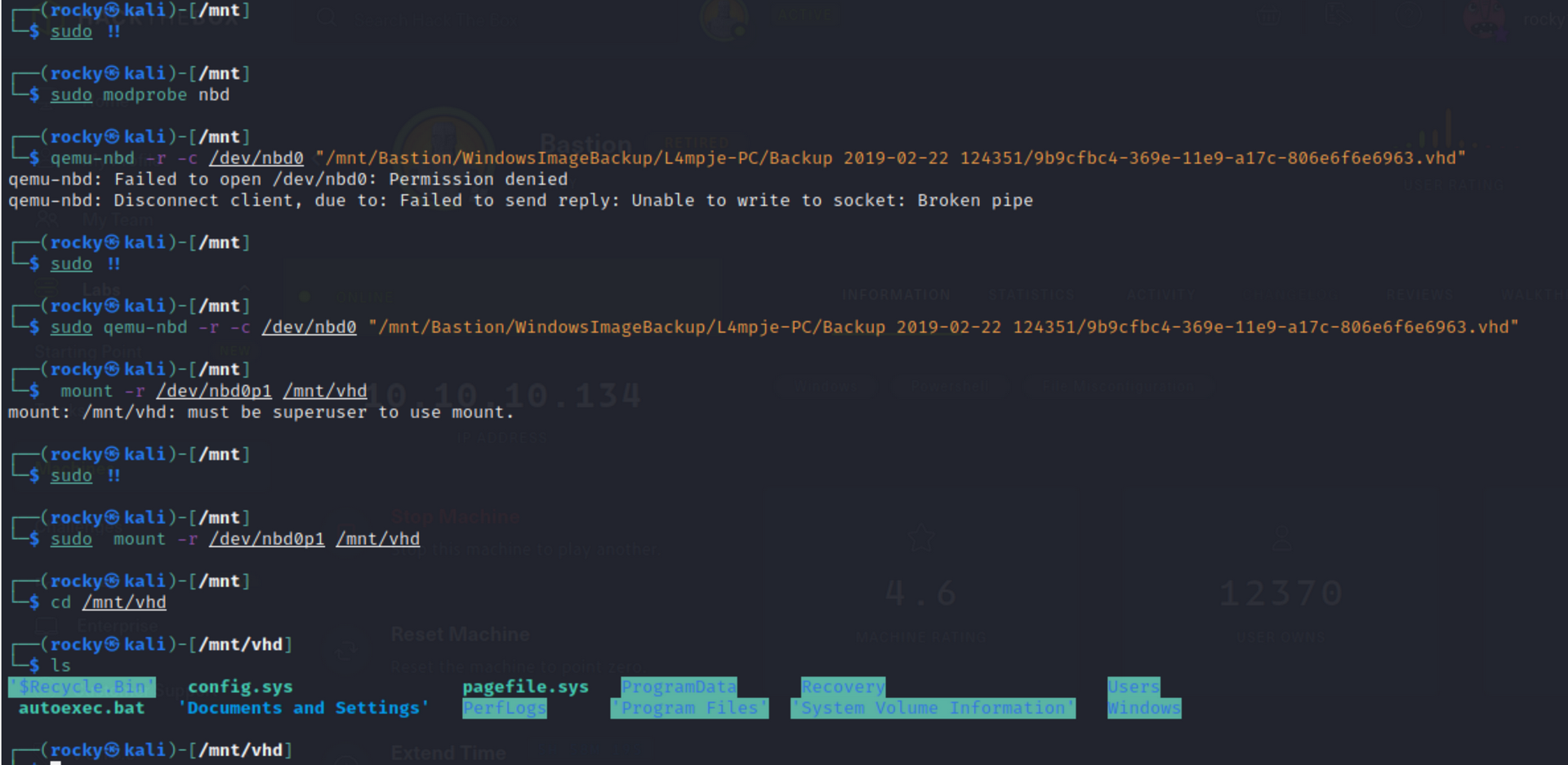
How to mount the VHD files using qemu Link to heading
If it does not work as guestmount, the qemu option can be tried to mount vhd
commands as follows:
sudo modprobe nbd

sudo qemu-nbd -r -c /dev/nbd0 "/mnt/Bastion/WindowsImageBackup/L4mpje-PC/Backup 2019-02-22 124351/9b9cfbc4-369e-11e9-a17c-806e6f6e6963.vhd"

sudo mount -r /dev/nbd0p1 /mnt/vhd

cd /mnt/vhd

ls
Unmount files once enumeration finished. Link to heading
Once the enumeration is done its best practise to unmount the smb shares which you got mounted on local machines. You can use below commands to unmount.
umount /mnt/vdi

qemu-nbd -d /dev/nbd0
